> ## Documentation Index
> Fetch the complete documentation index at: https://docs.converlens.com/llms.txt
> Use this file to discover all available pages before exploring further.
# Contacts
# About Contacts
Welcome to Contacts. The Contacts section is your central hub for managing and organising stakeholder information. It allows you to:
* Store and manage contact details
* Create lists for targeted communication
* Apply labels to categorise contacts
* Customise fields to track relevant information
* View stakeholder engagement history, submissions, tasks and email history
# Where to find Contacts
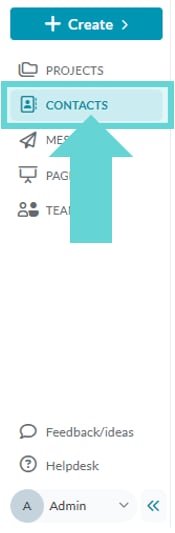
To access Contacts, open the Workspace Sidebar and click Contacts.
# Contacts Overview
The main Contacts view serves as your home for contact management. From here, you can:
* **View & search contacts**: Locate individual contacts using the search bar and filters.
* **Create & manage Lists**: Group contacts for better organisation.
* **Customise Fields**: Define what data is collected for each contact.
* **Apply Labels**: Categorise contacts without grouping them into lists.
* **Add, edit, or delete contacts**: Keep your database up to date.
* **View Reports**: Open contact reports and analytics.
Each contact entry provides a comprehensive view of the contact’s details, including their name, email, assigned labels, custom fields, list memberships and subscription state. It also includes:
* A **history of all engagement responses** associated with that email address.
* A **record of message broadcasts** sent to that email via Converlens Messages.
* **Activities, tasks and documents** linked to the contact.
This ensures quick and easy access to all relevant interactions and communications for each contact.
# Contacts Menu Bar
 The **Contacts Menu Bar** provides quick access to essential actions and settings.
**Key Actions in the Menu Bar:**
* **Contacts**: Returns you to the main Contacts list.
* **Reports**: Opens contact reports and analytics.
* **Lists**: Manage contact groupings.
* **Fields**: Customise data fields for contact records.
* **Labels**: Apply tags for flexible organisation.
* **Import Contacts**: Upload contacts from an external source.
* **New**: Manually create a contact, activity or task.
The **Contacts Menu Bar** provides quick access to essential actions and settings.
**Key Actions in the Menu Bar:**
* **Contacts**: Returns you to the main Contacts list.
* **Reports**: Opens contact reports and analytics.
* **Lists**: Manage contact groupings.
* **Fields**: Customise data fields for contact records.
* **Labels**: Apply tags for flexible organisation.
* **Import Contacts**: Upload contacts from an external source.
* **New**: Manually create a contact, activity or task.