

Open Submission Reader
To access the Submission Reader view, from Explore in the Project Navigation tab, click on a submission from the Results View. This will open the Submission Reader in an overlay. To exit the Submission Reader view click on the x in the top right hand corner of the overlay window.Navigating Submission Reader
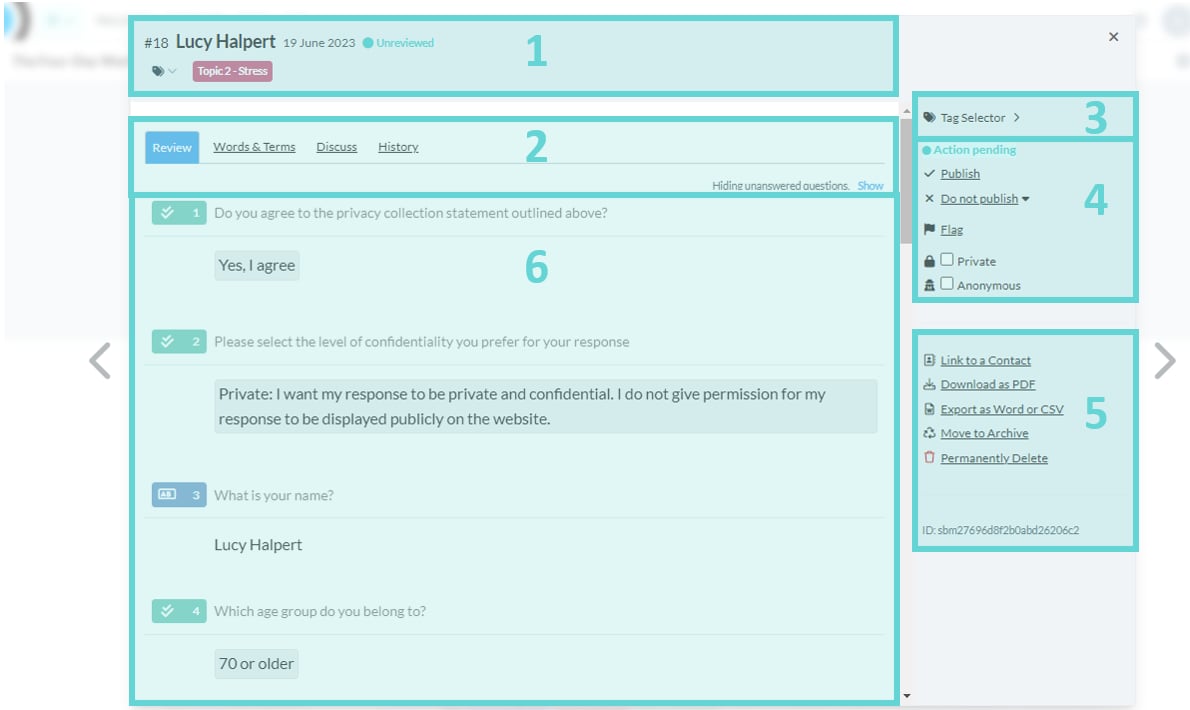
- Submission Details: This section displays the result number, display name, date received, status, and submission tags.
- Submission Navigation Bar: Use the submission navigation bar to switch between four tabs: Review to read all question responses, Words & Terms for a breakdown of key terms and phrases, Discuss to add team comments, and History for a record of major changes to the submission. Note you can enable the display of any questions that were not answered by clicking the link to “Show” hidden questions in this area.
- Tag Selector: Apply or remove tags for the submission, and access the tag editor to manage all tags for the project.
- Publishing Settings: Manage the status and visibility of the submission, including options to designate it as private or anonymous. If response publishing is enabled for the project, you will also see the submission publish status, options to publish or set as ‘do not publish,’ and flag the submission.
- Submission Actions: Interact with the submission through various actions, such as downloading as PDF, exporting, moving to archive, restoring archived responses, copying an editable draft link, converting draft/submitted status where available, and viewing metadata.
- Submission View: Explore submission answers, view each question, interact with submission text, apply codes to specific sections, edit response text, and toggle visibility of individual questions if response publishing is enabled.