

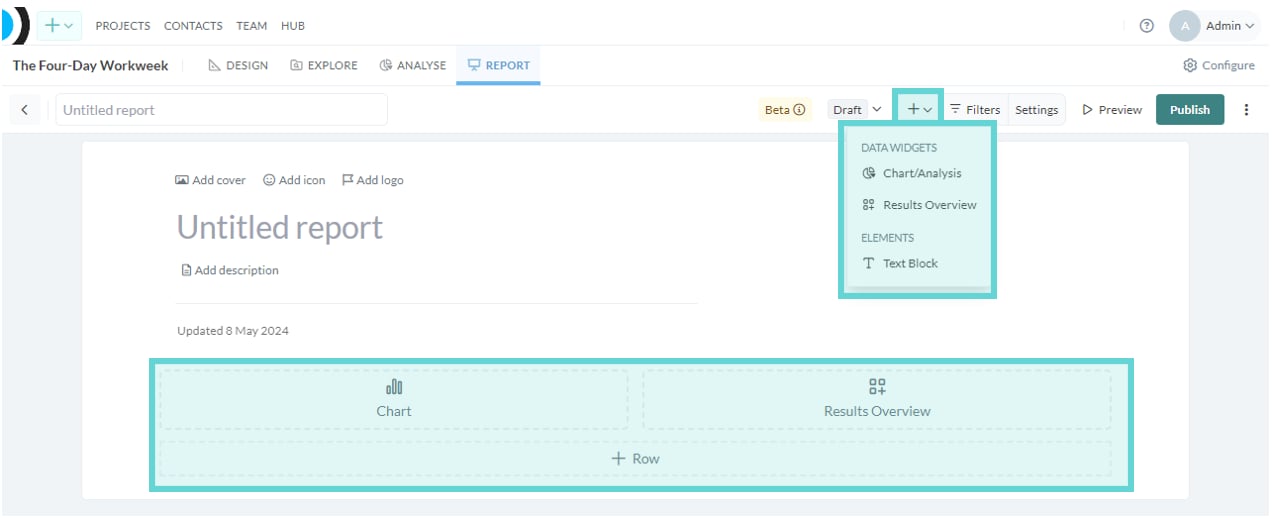
Widgets serve as modular tools within the report builder, allowing you to add dynamic visualisations derived from survey data and text elements straight into your report. Report Widgets screenshot: Widgets serve as modular tools within the Reports Builder, allowing you to add dynamic visualisations derived from survey data (charts and overview) and textual elements (Text block/Row) straight into your report. To access Report Widgets, scroll to the bottom of the report builder view. Alternatively, click the + button in the Reports Toolbar to quickly access Report Widgets.

Widgets

There are currently three widgets to include in reports:
  • Chart: Insert and create visualisations from Analyse directly in the report builder.
  • Overview of results: Insert and edit a Results Overview in the report builder.
  • Text Block: Add original text content to the report.