About Words & Terms
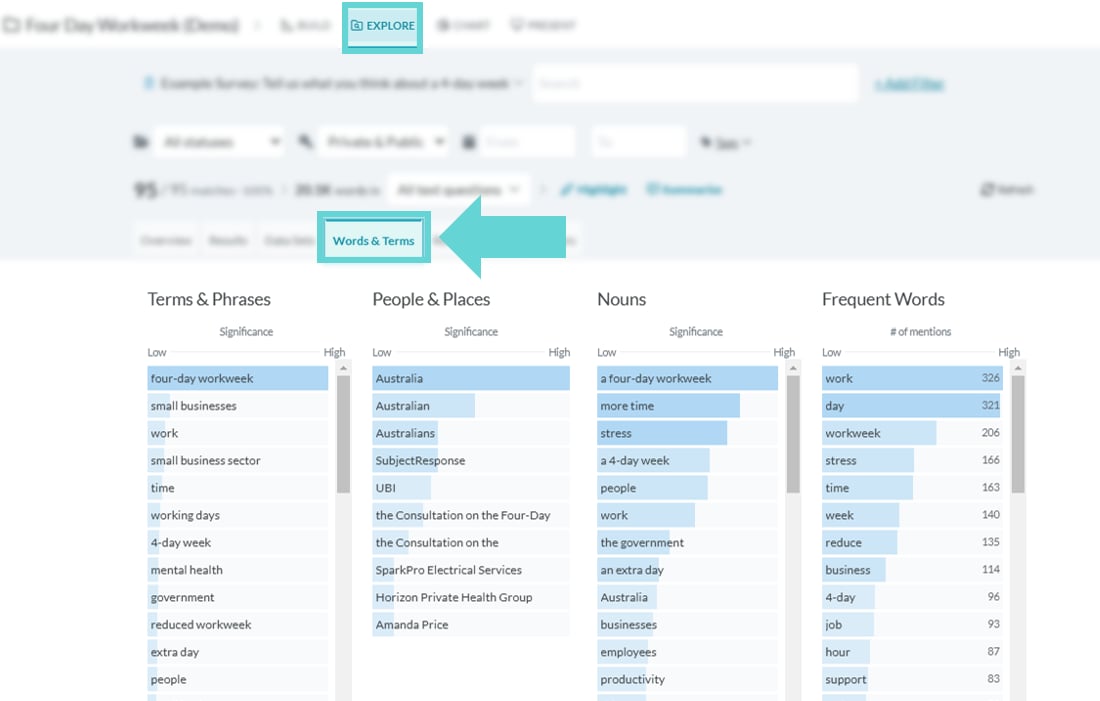
Words and terms shows four categories of language used in submissions by respondents. Explore the common Terms & Phrases, People & Places, Nouns and Frequent words to get an early understanding of common discussions.Where to find Words & Terms
To access Words & Terms, open Explore from the Project Navigation bar, and select Words & Terms from the navigation tabsWords & Terms options
Language categories
- Terms & Phrases: identifies specific terms and phrases frequently mentioned in the survey responses. It helps identify recurring themes, popular topics, or significant concepts that emerge from the data.
- People & Places: identifies names of individuals, organisations, or locations mentioned in the survey responses. It helps recognise key figures or geographical areas that are relevant to the survey topic.
- Nouns: captures common nouns found in the survey responses. It allows for an understanding of the objects, ideas, or entities frequently referenced by participants.
- Frequent words: highlights words that appear most frequently in the survey responses. By identifying these commonly used words, it helps uncover the prevailing sentiments, popular opinions, or significant keywords within the dataset.
About Significance and # of mentions
The Words and Terms feature not only shows common terms, phrases, names, and nouns used in your survey responses but also includes a significance bar to indicate how prominent each term is. This bar ranges from Low to High and is highlighted in blue, with a fully blue bar indicating high significance and a partially blue bar indicating lower significance. Determining significance:- Significance and Frequency: While frequency plays a role, significance also considers the context and impact of the term within the dataset. A term might appear only once but could be deemed highly significant if it’s particularly relevant or unusual in the context of the responses.
- Contextual Relevance: The NLP (Natural Language Processing) algorithms assess not just how often a word appears but how crucial it is to the overall themes and discussions in your data. This helps to surface words that are important for understanding the key insights from your data.
- # of mentions: The Frequent Words category counts the number of times each word is mentioned across the dataset. This is represented by a Low to High significance bar, indicating the frequency of the word’s occurrence. The exact count of mentions is displayed to the right of each word, allowing you to identify the most commonly used terms in your data.
Apply filters
Use search filters to explore changes across demographics or focus on specific questions. In the Add a Filter section, you can:- Enter a search term (or multiple terms)
- Apply a question-based filter
- Apply a tag-based filter
- Filter by Status
Refining Results with the Text Limiter